Why modern distributors can't ignore warehouse management systems
If your warehouse still depends on paper pick slips, spreadsheet inventory tracking, and tribal knowledge from your longest-serving warehouse employee, there's a good chance inefficiency is already eating into your margins.
It usually starts small.
A picker spends 20 minutes searching for one SKU because the product was moved and nobody updated the location. A route driver leaves the warehouse assuming stock is available, only to discover halfway through the day that inventory counts were wrong. Your office team spends hours reconciling invoice discrepancies after deliveries are complete.
Then the problems compound.
Orders go out late. Returns increase. Inventory carrying costs climb because nobody fully trusts the stock numbers. Your warehouse team works harder every month, but fulfillment performance doesn't improve.
For distributors managing hundreds of SKUs, multiple daily routes, customer-specific pricing, and tight delivery windows, warehouse inefficiency quickly becomes a revenue problem rather than just an operational inconvenience.
Meanwhile, competitors using modern warehouse systems are operating differently. Orders are staged in route sequence before drivers arrive. Inventory updates in real time. Pickers follow optimized workflows instead of relying on memory. Delivery data flows directly into invoicing and accounting systems without manual re-entry.
That operational gap is exactly what warehouse management system implementation is designed to close.
A properly implemented WMS changes how inventory moves through your operation. Receiving becomes faster. Picking becomes more accurate. Warehouse visibility improves. Drivers leave on time with verified orders. Teams stop making decisions based on assumptions and start working from live operational data.
For distributors specifically, the biggest impact often comes from connecting warehouse execution with route operations. When warehouse activity, inventory availability, route staging, and mobile invoicing work together, the entire distribution process becomes more predictable and easier to scale.
This guide breaks down what WMS implementation actually looks like in practice. Not the polished software demo version. The real operational process distributors go through when they move from manual warehouse workflows to a connected system.
What is WMS implementation?
A warehouse management system controls how inventory moves through your warehouse. It manages receiving, putaway, picking, packing, transfers, cycle counts, and shipping while maintaining accurate inventory records throughout the process.
WMS implementation is the process of introducing that system into your actual operation.
That includes:
- Evaluating your current workflows
- Organizing warehouse layouts
- Cleaning inventory data
- Integrating systems
- Training warehouse staff
- Testing workflows
- Managing go-live
- Refining processes after launch
The software itself is only one part of the project.
The bigger change is operational.
When implementation is done correctly, warehouse teams stop relying on memory, spreadsheets, handwritten notes, and disconnected systems. Inventory movement becomes traceable. Verification becomes built into workflows. Managers gain visibility into productivity and inventory accuracy in real time.
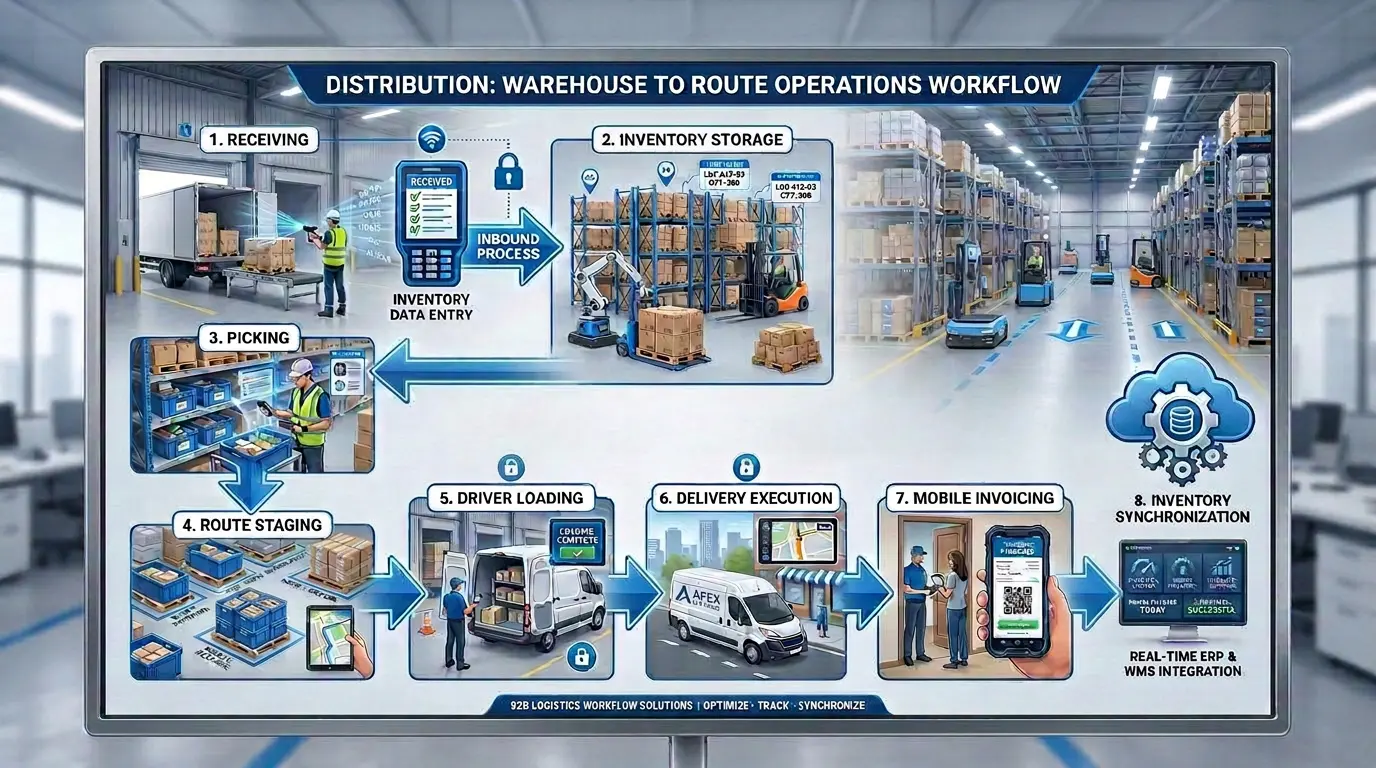
For distributors, this operational shift affects more than the warehouse alone. Receiving becomes faster because products are scanned directly into inventory. Pickers follow structured workflows instead of manually locating products. Packing includes verification before shipments leave the building. Route staging becomes coordinated with dispatch schedules. Drivers can confirm stock availability before leaving the warehouse.
Instead of warehouse operations and route operations functioning independently, they start operating as one connected workflow.
That's where implementation starts creating measurable business impact.
Signs your distribution business has outgrown manual warehouse processes
Most distributors already know when warehouse operations are becoming difficult to manage. The warning signs are usually obvious long before implementation discussions begin.
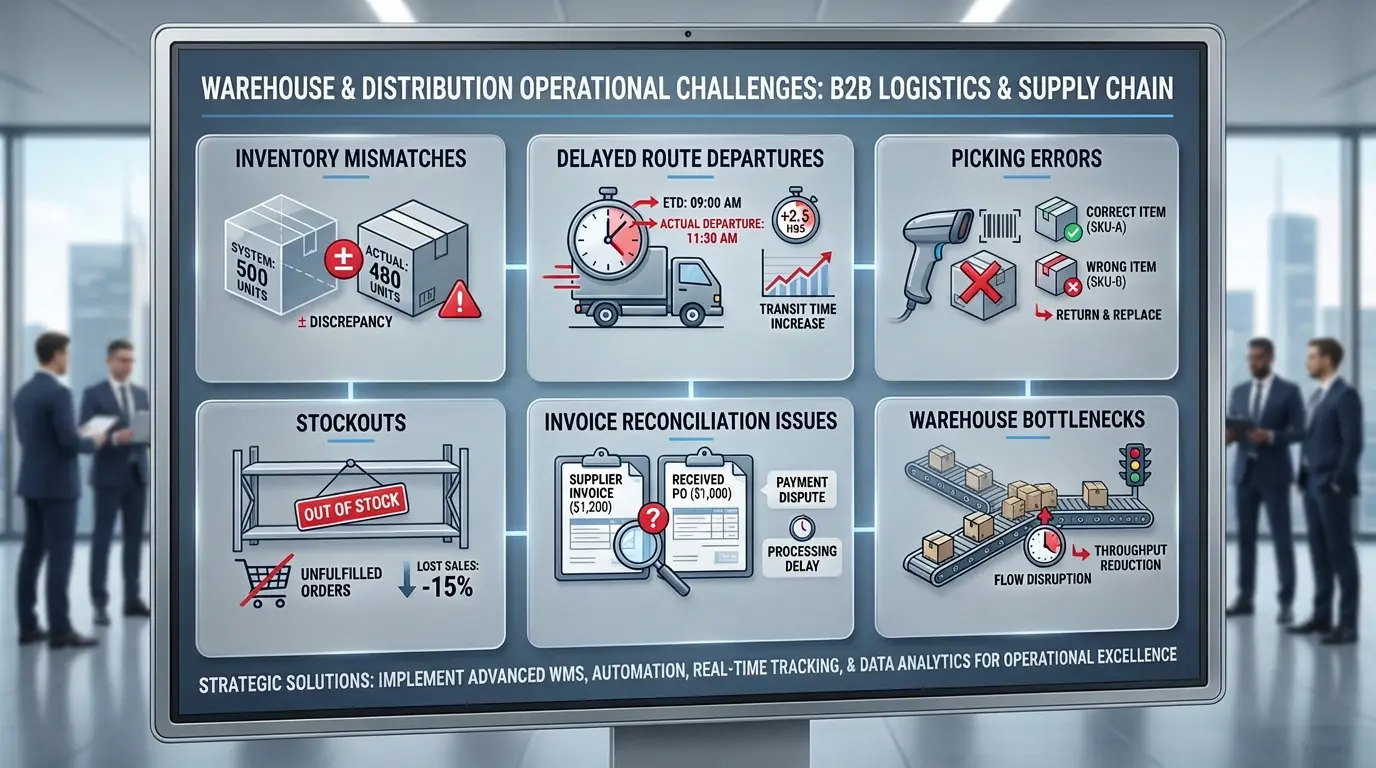
Inventory counts constantly conflict.
Your system says you have 1,200 units available. The warehouse team counts 860. Sales promises inventory that isn't actually there. Purchasing over-orders products because nobody trusts the numbers. When inventory accuracy becomes unreliable, every department starts compensating manually.
Orders take too long to pick.
A simple order should take 15 minutes but consistently takes 40 because products are stored inefficiently or pickers rely on memory instead of standardized workflows. As SKU counts increase, inefficient layouts become expensive very quickly.
Picking errors and returns are increasing.
Customers receive incorrect quantities, wrong product variants, or incomplete orders. Returns climb. Customer service spends time resolving avoidable fulfillment mistakes. Most warehouse errors happen because verification processes are inconsistent or missing entirely.
Drivers arrive before orders are ready.
Warehouse and route operations aren't coordinated. Drivers wait while orders are still being picked. Dispatch schedules get delayed before routes even begin. That lost time affects the rest of the delivery day.
Manual receiving consumes too much labor.
Inbound shipments take hours to verify, document, and store. Inventory updates happen late or inconsistently. Product availability visibility lags behind physical inventory movement.
Inventory counts disrupt operations.
Cycle counts or year-end counts slow the business down for days because inventory accuracy has to be manually rebuilt through large physical counts.
Warehouse productivity is unclear.
You don't know:
- Which workflows are slowing fulfillment
- Where bottlenecks exist
- Whether layouts are efficient
- How productive teams actually are
- Where labor time is being lost
Operational decisions become reactive instead of data-driven.
Invoice reconciliation is becoming painful.
Warehouse data, route data, and invoicing systems don't align. Drivers return with paperwork that requires manual entry and corrections.
Small errors create hours of administrative cleanup.
If several of these issues are happening consistently, implementation usually becomes less of a technology project and more of an operational necessity.
Why warehouse efficiency directly affects route performance
For distributors, warehouse operations and route operations are tightly connected whether systems reflect that or not.
When the warehouse falls behind, routes fall behind.
Consider a beverage distributor running 30 routes daily across hundreds of retail accounts. Drivers arrive at 5 AM expecting staged orders. Half the orders are still in picking because warehouse priorities weren't aligned with dispatch schedules. Drivers lose an hour waiting to load. That delay affects the entire delivery schedule for the day.
Later, a customer requests additional stock during delivery. The driver calls the warehouse to check availability, but inventory numbers are outdated or uncertain. Nobody can confidently confirm available stock. The sale disappears.
At the end of the day, drivers return inventory that didn't sell. Office staff manually reconcile returns, invoices, and inventory discrepancies while trying to update accounting systems afterward.
None of these problems exist in isolation. Disconnected warehouse operations create downstream delivery inefficiencies, delayed invoicing, inaccurate inventory visibility, and unnecessary labor costs across the business.
With a properly implemented WMS connected to route management workflows, operations become significantly more coordinated. Orders are staged according to route departure schedules. Drivers can see live inventory before leaving the warehouse. Inventory updates immediately as deliveries happen. Mobile invoicing syncs directly with warehouse and accounting systems.
That operational visibility improves:
- Route departure times
- Order accuracy
- Inventory reliability
- Delivery responsiveness
- Invoicing accuracy
- Customer service consistency
For distributors, this is usually where WMS implementation creates the most meaningful operational gains.
The WMS implementation process
Step 1: Document your current warehouse operation
Before changing anything, document how your warehouse actually works today. Not how processes are supposed to work. How they really work.
Walk through receiving, picking, packing, staging, and dispatch processes with your team. Time workflows. Watch how inventory is located. Observe where delays happen. Identify where manual workarounds exist.
Your warehouse team already knows where operational friction lives. Implementation becomes easier when those insights are captured early instead of discovered later during go-live.
Measure your current baseline:
- Picking speed
- Order cycle time
- Inventory accuracy
- Fulfillment error rate
- Receiving time
- Route staging delays
Without a baseline, it becomes difficult to measure whether implementation is actually improving operations.
Step 2: Organize the warehouse for efficient picking
Even strong software struggles inside a poorly organized warehouse.
Fast-moving products should be easy to access. Slow-moving inventory can occupy less convenient storage areas. Receiving, staging, packing, and dispatch areas should support natural warehouse flow rather than forcing unnecessary movement.
Most distributors do not need a perfect warehouse layout before implementation. They need a logical layout that supports operational consistency.
Create clear location structures:
- Aisle numbers
- Bin locations
- Shelf identifiers
- Zone labeling
Consistency matters more than complexity. Warehouse layouts can continue evolving after implementation once operational data starts identifying high-velocity products and picking inefficiencies.
Step 3: Clean inventory data thoroughly
This is the step many companies underestimate.
A WMS depends entirely on inventory accuracy. Bad starting data creates operational distrust immediately after launch.
Conduct a complete physical inventory count. Reconcile discrepancies. Standardize SKU naming conventions. Remove duplicate SKU records. Verify product dimensions, barcodes, units of measure, and product descriptions.
If barcode systems are incomplete or inconsistent, fix them before implementation moves forward.
Distributors that rush through inventory cleanup usually spend months correcting preventable issues after go-live. Good inventory data builds confidence in the system from day one.
Step 4: Put the right hardware in place
Warehouse software is only effective if teams can reliably interact with it during daily operations.
That usually includes:
- Handheld mobile devices
- Barcode scanners
- Label printers
- Warehouse WiFi coverage
- Tablets for supervisors or route staging
- Reliable cloud or server infrastructure
The cheapest hardware option often creates operational bottlenecks later through slow scanning, unreliable connectivity, or device failures. Warehouse teams depend on these tools constantly. Reliability matters more than minimizing upfront hardware costs.
Step 5: Integrate your systems properly
Warehouse operations do not exist independently from the rest of the business.
Your WMS needs to communicate with:
- ERP systems
- Accounting platforms
- Purchasing systems
- Route management software
- Mobile invoicing tools
Inventory updates should flow automatically between systems instead of requiring manual reconciliation.
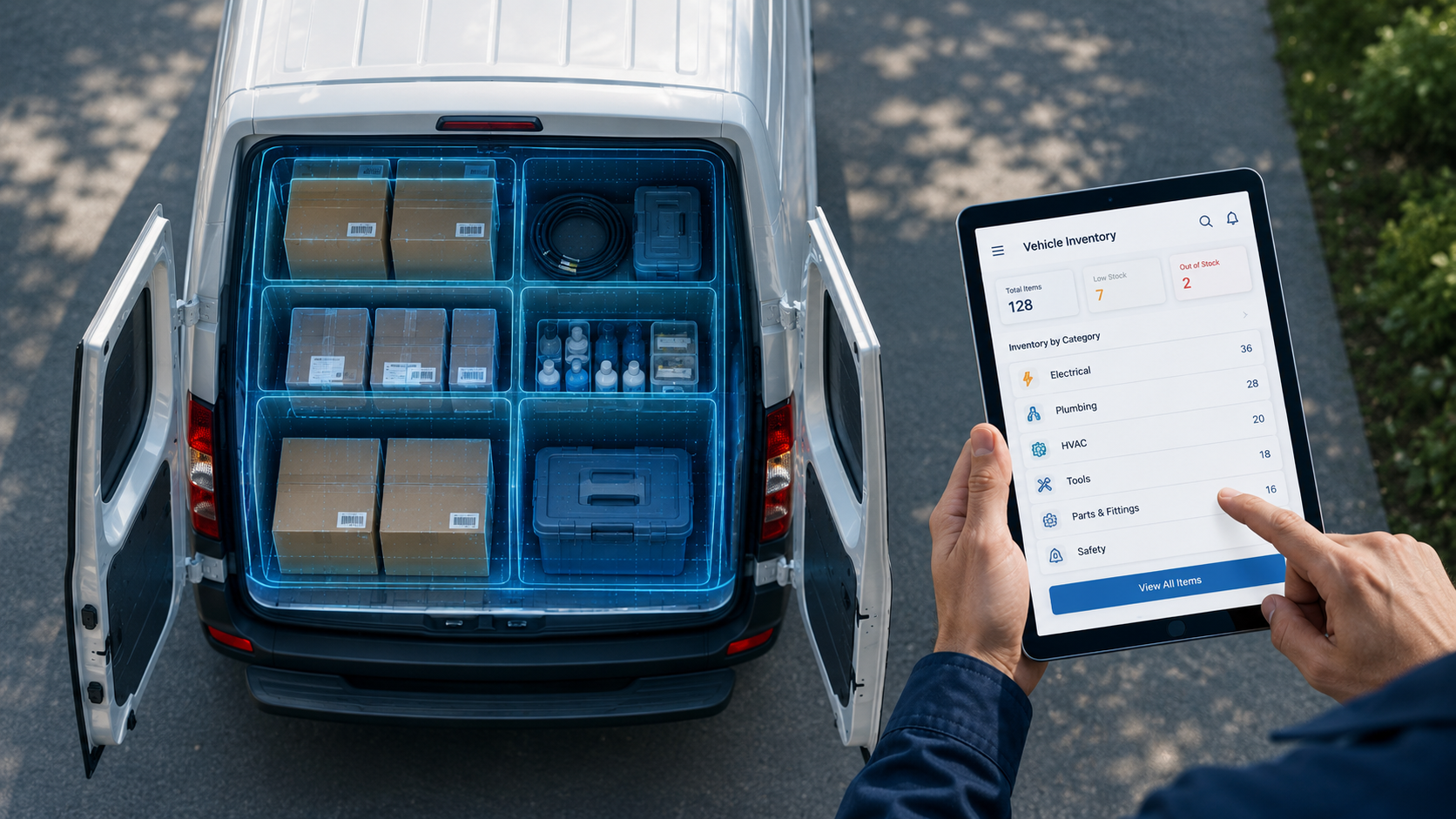
For distributors, route coordination is especially important. Warehouse teams need visibility into route schedules and staging priorities. Drivers need visibility into inventory availability. Accounting systems need accurate delivery and inventory movement data.
Integration projects almost always take longer than companies expect. Data inconsistencies, configuration differences, and workflow mismatches usually surface during testing. That's normal. Test integrations thoroughly in a sandbox environment before touching live operations.
Step 6: Train your warehouse team properly
Most WMS implementation problems are people problems rather than software problems.
Warehouse teams need hands-on training using real products and real workflows inside the actual warehouse environment.
Different roles need different training:
- Pickers
- Receivers
- Packers
- Supervisors
- Dispatch teams
- Inventory managers
Avoid generic one-size-fits-all training sessions. Identify experienced employees who can become internal system champions. These people help support the rest of the team during rollout and reduce resistance during adoption.
Some resistance is inevitable during implementation. Warehouse operations are highly routine-driven. New workflows create uncertainty, especially when teams worry automation may eventually replace jobs. Address those concerns directly instead of ignoring them.
Teams adopt systems faster when they understand how workflows improve daily operations rather than simply being told to follow new procedures.
Step 7: Run a pilot before full deployment
Going live across the entire warehouse immediately creates unnecessary risk.
Start with a controlled pilot instead. That could mean:
- One warehouse zone
- One shift
- One product category
- One picking workflow
Run the existing process alongside the new system during testing so teams have a fallback if issues emerge.
Track:
- Picking speed
- Error rates
- Workflow confusion
- Scanning failures
- Inventory mismatches
- Productivity changes
Daily feedback sessions during the pilot phase usually uncover problems quickly while they're still manageable. Skipping pilots to save time often creates larger operational disruption later.
Step 8: Go live and monitor aggressively
Go-live is where implementation becomes operational reality.
Expect the first few weeks to feel slower than normal. Warehouse teams are learning new workflows. Productivity usually dips temporarily before stabilizing and improving.
During this period:
- Keep vendor support accessible
- Monitor operational KPIs daily
- Track fulfillment delays closely
- Identify workflow bottlenecks immediately
- Hold short daily review meetings
The first month after launch is often where long-term adoption success gets decided. Companies that remove support too early usually struggle with workarounds, inconsistent usage, and operational drift later.
Common WMS implementation mistakes
Underestimating data cleanup.
Dirty inventory data causes problems long after go-live.SKU inconsistencies, duplicate records, and barcode errors create immediate distrust in the system.
Data preparation deserves far more time than most companies initially allocate.
Treating implementation as an IT project.
Implementation affects warehouse operations, purchasing, dispatch, customer service, accounting, and route coordination.
This is an operational transformation project, not just a software deployment.
Skipping hands-on training.
Teams do not learn warehouse systems effectively through presentations alone.
Operational training needs to happen in the warehouse using real workflows and actual inventory.
Ignoring change resistance.
Warehouse teams naturally resist workflow changes when communication is poor or leadership appears disconnected from daily operations.
Involve warehouse employees early. Listen to operational concerns. Show how workflows improve.
Pulling support too quickly.
Many implementations struggle in weeks two through six because companies assume teams should already know the system by now.
Ongoing support matters more than most businesses expect.
What successful implementations usually do differently
Companies that implement WMS successfully tend to follow similar operational habits.
They phase implementation instead of changing everything simultaneously.
They update inventory in real time instead of batching updates later.
They train core warehouse leaders deeply before rollout.
They use mobile devices early during testing instead of waiting until go-live.
They continuously review workflows after launch instead of treating implementation as finished.
Most importantly, they keep warehouse operations connected to broader distribution workflows rather than treating the warehouse as a standalone operation.

Metrics that matter after go-live
Implementation success should be measured operationally, not emotionally.
Key metrics include:
- Inventory accuracy
- Order cycle time
- Picking accuracy
- Orders shipped on time
- Warehouse labor productivity
- Inventory turnover
- Route departure timing
- Fulfillment error rates
Most distributors should expect measurable improvements within the first few months after stabilization.
The exact gains vary by operation, but better visibility, improved coordination, and reduced manual reconciliation usually create meaningful efficiency improvements fairly quickly.
Conclusion
WMS implementation is not simply about replacing spreadsheets with software.
It's about building operational structure that allows distribution businesses to scale without losing control of inventory accuracy, fulfillment consistency, and delivery coordination.
The process is rarely perfect. There will be delays, workflow adjustments, and moments where implementation feels more difficult than expected.
That's normal.
What matters is getting through the transition period with systems and workflows that support long-term operational growth instead of constantly relying on manual fixes and institutional memory.
For distributors, warehouse efficiency directly affects route execution, delivery reliability, customer satisfaction, and profitability. The businesses improving fastest right now are usually the ones connecting warehouse operations, inventory visibility, route coordination, and invoicing into one unified operational workflow.
bMobile Route helps distributors bridge those operational gaps by connecting warehouse activity with route management, inventory visibility, mobile invoicing, and delivery execution in real time.
When warehouse and route operations work together instead of independently, distributors gain faster dispatch coordination, more accurate inventory movement, improved delivery performance, and better operational visibility across the business.
Still relying on manual warehouse workflows that slow down your routes and create inventory headaches?
Book a demo with bMobile Route